Preprinted Label Rolls: Match the Printer Reference to the Lot Code Window
When a lot code lands in the wrong place on a preprinted roll, compare the printed code with the printer's reference for the start of each label. Approve the media and its repeat reference on the actual printer before buying another production roll. If a printer feeds one label at a time correctly and the code stays the same distance out of position, review the print origin and artwork. If the printer skips a label or the offset changes, investigate sensing and the roll before accepting a layout change.
Put the printer's reference on the roll drawing
Ask the printer owner to identify the device, the direction the web enters, the leading edge and the feature the printer reads. Some models detect the difference between the label and liner at a gap, or locate a notch. Other configurations use a reflective sensor to read marks on the liner. Zebra's industrial printer guide describes these media types on specific print engines. Use the documentation for your own machine to confirm whether it supports the proposed construction and where its sensor reads.
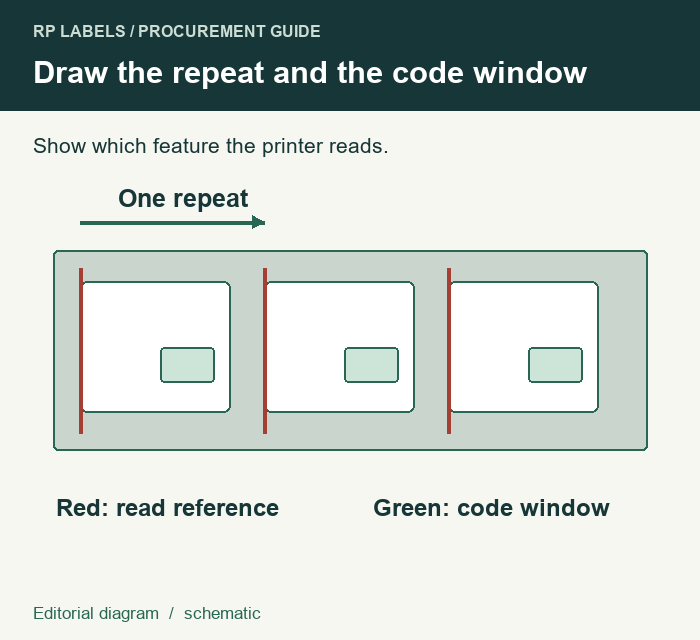
Ask the converter to mark the repeat from one reference to the next and the distance from that reference to the approved coding panel. If the roll uses a back mark, ask for the required mark face and position as seen by the printer. Keep the code window and the sensing feature on the same drawing revision. Avery Dennison's printer guide illustrates separate pitch references for die-cut, black-mark and aperture stock. It gives examples of how the repeat is defined for its printer, with the actual mark dimensions and limits set by the equipment in use.
Inspect a sequence of codes on the finished roll
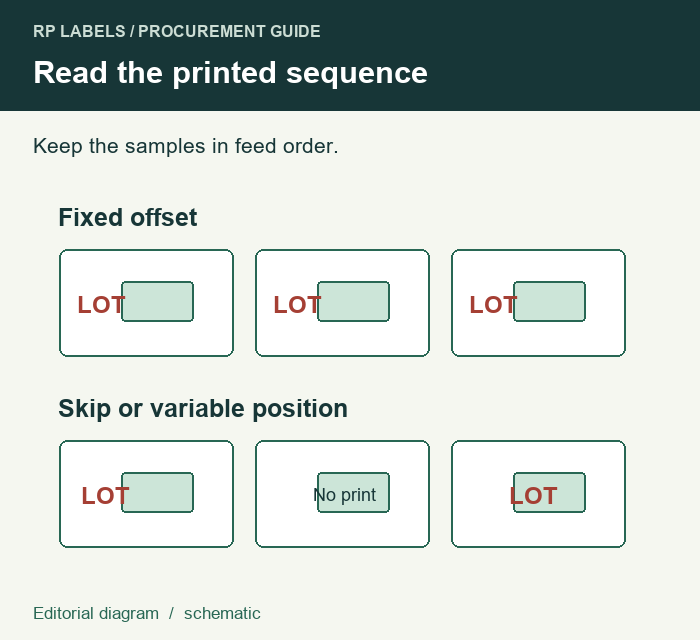
Ask the line owner to run several consecutive labels on the intended device using the actual preprint and liner. Keep the job file and consumables identified. Mark each observed code position in relation to the panel, and note if the device feeds an extra label or misses a print. Compare a first run with a restart if the job will normally stop and resume. Preserve the order of the specimens so the printer owner can distinguish a fixed shift from skipped or changing positions.
| Sequence observed | Next check |
|---|---|
| One print per label, with the same offset each time | Ask the printer owner to compare the accepted panel location with the job file and print origin. |
| The position changes or the device skips labels | Have the printer owner review how it detects the repeat, then compare the finished roll and the approved media drawing. |
| Position is correct on the roll but the code fails after handling | Keep registration evidence and evaluate the printed code under the intended handling conditions. |
The supplement overprint-zone guide helps define what the later code needs to remain legible. If the finished roll also runs through a separate applicator, have the packer approve that machine's sensing and placement independently.
Send the roll drawing with your quote brief
Prepare your RP Labels inquiry with the media diagram, finished label dimensions, quantity per design, print device and its confirmed sensing requirements. Include the artwork revision, intended code window and an annotated sequence from the trial if available. Ask whether the required liner and reference feature can be quoted together and what sample the printer owner can use for approval.