Supplement Flavor and Count Labels: Match Each Trade Item to Its Approved GTIN
The design team has duplicated the citrus label for a new berry bottle. The color and flavor name have changed. The barcode looks perfectly sharp, but the number underneath is still from the citrus artwork.
In this hypothetical release, the artwork problem is visible only if someone compares it with the product-data record. A scan can faithfully read the wrong identifier. I would put the trade-item decision on the table before the printer receives the duplicated files.
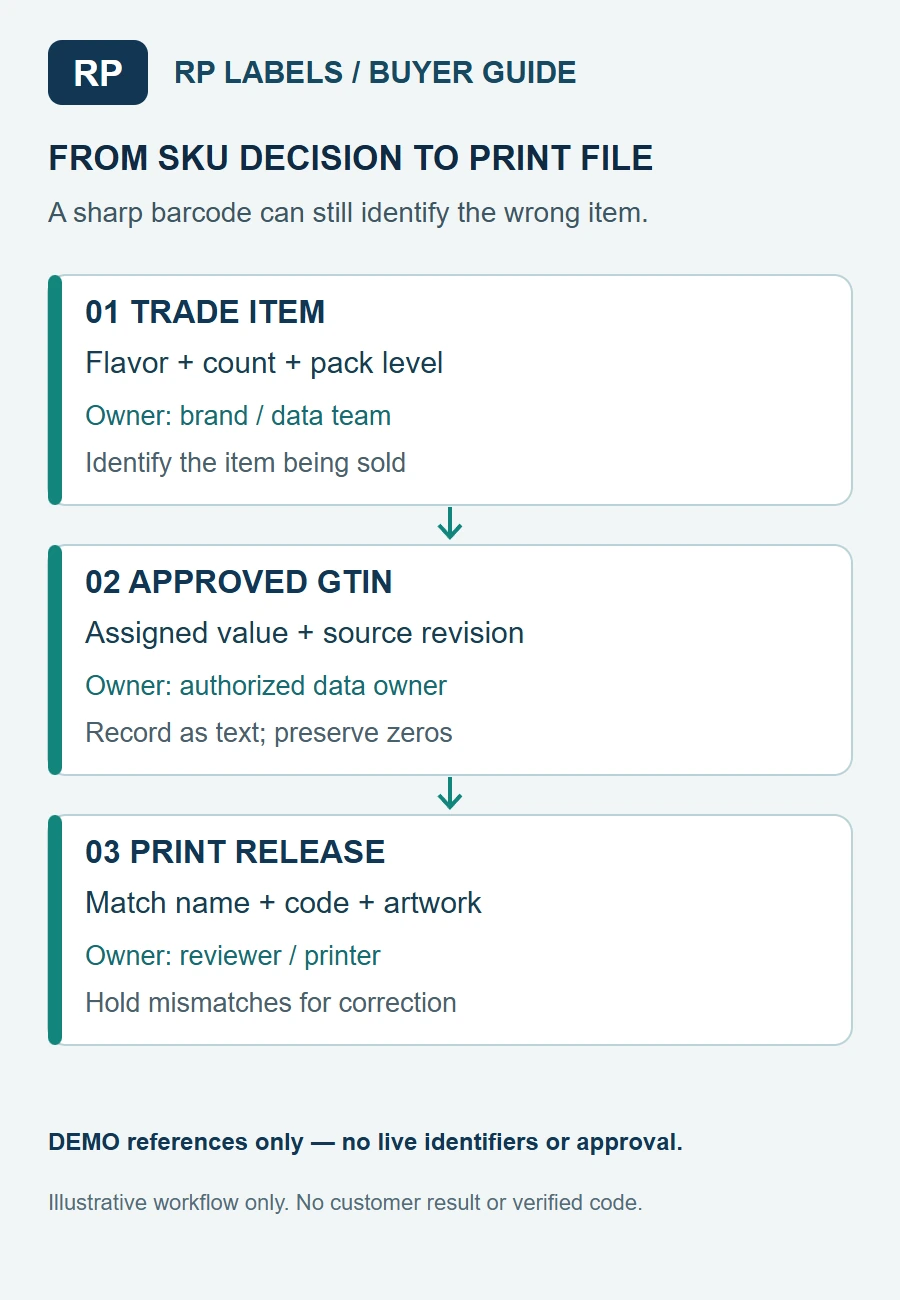
Procurement workflow illustration. DEMO references are fictional and are not assigned GTINs or working barcodes.
Identify what the customer is ordering
A flavor, count or package grouping can create a distinct trade item. The decision depends on the actual product and relevant GS1 rules, not on whether the designer chose a different color. A brand owner or other authorized party should determine and supply the correct assigned identifier for each item.
The GS1 GTIN Management Standard explains when changes to a trade item or a predefined assortment require a new identifier. Apply the relevant rule to the real product and market; do not let the label printer invent numbers or make the brand's data-management decision.
Consider a fictional family with citrus and berry bottles in the same count. If the products are separate trade items, the product owner must confirm the separate assigned GTINs before either label is released. A change from 30 capsules to 60 may likewise require a separate trade-item decision. The actual answer belongs to the authorized product-data owner applying the applicable rules.
If the only change is a decorative color that does not change the trade item, the existing identifier may remain appropriate. That is a useful reason not to assign a new number automatically for every artwork revision. Check the complete change, including count, formulation and packaging hierarchy, rather than treating color as the decision rule.
Build the matrix before copying artwork
Give each intended saleable item a stable internal reference and record its flavor, count, pack level and current product-data revision. Place the approved GTIN reference beside the matching artwork revision. Keep assigned identifiers as text in the controlled file so leading zeros survive export.
The worked SKU handoff uses fictional product references without live identifiers. The berry row points to a duplicated artwork file and remains pending until the owner supplies its approved value. The citrus row also remains pending until the actual product-data reference is attached. Neither row represents an RP customer order.
Use the blank handoff and field guide to connect the item, approved source, print file, reviewer and next action. Empty identifier fields mean unknown, not that two products are authorized to share one.
Keep the bottle, multipack and case distinct
The bottle may be sold individually, placed in a predefined multipack or shipped in a case. Do not assume the code on one level automatically identifies the other. Ask the product-data owner which levels are trade items in this project and which assigned values belong to them.
The printer needs the exact artwork for the label it is making, not a spreadsheet of every code in the company. Send only the relevant approved value and reference, with the packaging level clearly named. If a case label is supplied separately, identify its owner and keep it linked to the correct bottle family.
A mixed assortment can add another decision: the buyer must know which individual items and quantities make up the defined pack. GS1's standard includes rules for changes in predefined assortments. A diagram of the pack can help the team compare its composition with the approved data, but it is not a replacement for the brand owner's allocation decision.
Run a cross-check that can catch a good-looking mistake
Before print, have the product-data owner compare the decoded value on each proof with the controlled SKU matrix. The artwork reviewer checks that the visible name, flavor, count and revision correspond to that same row. The print supplier confirms which approved file it will reproduce.
Use an intentionally wrong fictional row in an internal review exercise if the team wants to test the handoff: the berry name with the citrus identifier reference should be stopped even if the visual layout is otherwise flawless. Record the discrepancy and send it to the product-data owner; do not silently edit the master data to match the artwork.
The separate barcode verification guide explains print-quality evidence. A physical verification report can evaluate the symbol under an agreed method; it does not decide whether a number belongs to the berry or citrus product. Resolve identity and print quality with their respective owners.
What a useful inquiry contains
For custom supplement labels, send RP Labels the approved item-to-artwork matrix, bottle and pack references, file versions, quantity per design and the authorized code artwork or data. State whether variable information will be printed later and who controls it.
Ask the printer to identify which approved file belongs to each finished roll or stack. The handoff should let the packing team connect a physical label to the right product without relying on color alone. Keep the brand's identifier approval and any required barcode-verification report with that record.