A label can look crisp on a white proof sheet and murky on an amber vial. The glass changes the apparent color of transparent ink, while the room light and the liquid level can change it again. If the label includes a code or small lot field, I would ask to see the design on the filled bottle before approving the print file.
The decision is not simply "clear or white." You can keep a transparent window where seeing the vial matters, put opaque backing under product identity, and reserve a pale code panel where a reader needs contrast. The right split depends on the artwork and the actual amber shade. That is why a photographic mockup is useful for discussion but not a production acceptance test.
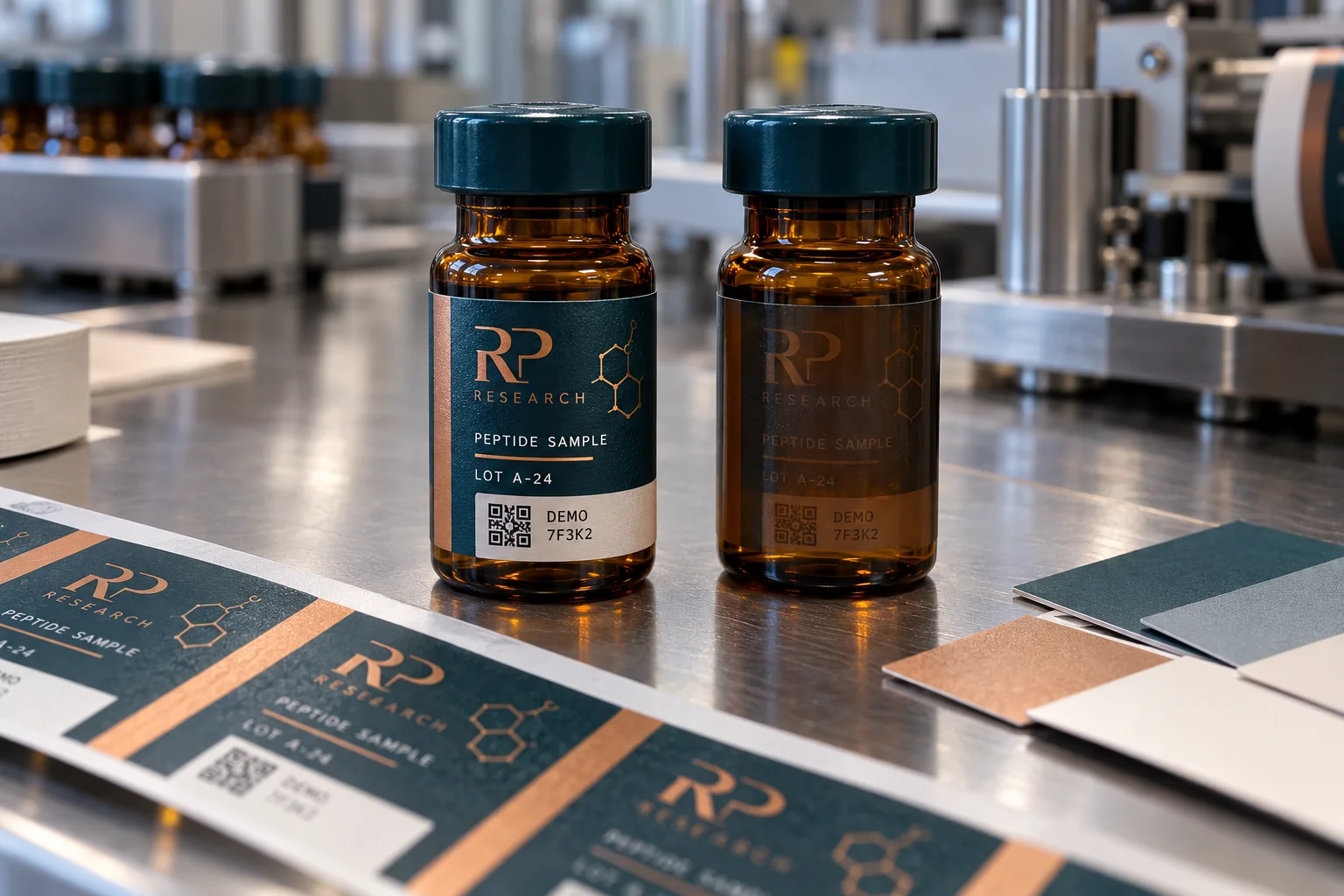
Choose which parts should show the glass
On amber glass, a clear film can produce a restrained no-label look. It can also darken a copper, green or gray design that appeared bright on a white monitor. HERMA's film-material overview shows that clear-on-clear and security constructions are distinct material choices. The face material is not the whole result: ink opacity and any white backing layer decide which parts of the design remain readable.
I would mark three zones on the artwork: decorative areas that may be translucent, identity and lot text that should remain legible, and machine-readable areas that need their own controlled background. A variable batch field printed later may require a compatible topcoat and a separate print test. Do not assume the same ink and ribbon that work on a white paper label will behave identically on a clear film.
Keep the code field deliberately plain
GS1's barcode steps identify dark bars on a light background as the optimum color direction for linear symbols. Its 2D color guide also warns against reflective materials behind 2D codes and explains why the quiet zone matters. If a code is required, put its specified symbol on a stable, non-reflective light field; do not let amber glass become an accidental part of the background.
The pictured codes in this guide are illustrative DEMO art. Your data owner must supply the real value, symbology and destination. The scanner owner should test several applied samples under the lighting and reading distance of the intended workflow. A successful phone scan at a desk does not validate a packing-line reader.
Approve the applied version, not the screen version
Request one opaque and one partially transparent printed proof on the real amber vial. View each upright, on its side and in the carton or tray where it will actually be picked. Check the color when the bottle is empty and filled if the fill line changes the appearance. Inspect the small print with the people who will read it.
Make the acceptance notes concrete: photograph the front at normal viewing distance, record whether lot and product name remain readable at arm's length, and scan the applied code with the intended device. If the bottle moves through cold storage or wet handling, repeat the review after those conditions rather than treating a dry desk sample as representative. This separates a color problem from an adhesion or surface-finish problem.
For a useful quote, send the bottle diameter and wall height, amber-glass sample or accurate photo, label dimensions, whether the label wraps fully, white-ink intent, variable data method and required code specification. If the result is too dark, change backing and color separation before asking the printer to make all ink heavier. A well-placed opaque zone usually solves a more precise problem.
Sources and scope
Reviewed October 3, 2026. The primary references linked below support the identified technical points. Buying scenarios and inspection checklists are editorial guidance, not RP production records, certification, legal approval or universal acceptance standards. Demand layer: competitor and process pages linked here, including Avery, HERMA or OnlineLabels where cited, illustrate buyer language and process topics only. They do not supply RP minimum quantities, lead times, prices, certifications or materials. Authority layer: an RP number is backed only by a factory datasheet, a signed quote or proforma, confirmed product data, or a fact kept on the About page. The March 2026 proforma there is one production-run example, not a standing offer. RP shipping and planning pages describe what to confirm on a quote. Worked figures on this page are fictional unless an authority source is named for them.