A buyer wants one small sticker to do two jobs: look unmistakably holographic and open a verification page when scanned. In a flat design file, placing a black QR symbol directly on rainbow foil seems efficient. Under real lighting, that shiny background can defeat the contrast the camera needs. The scan target deserves its own deliberate surface.
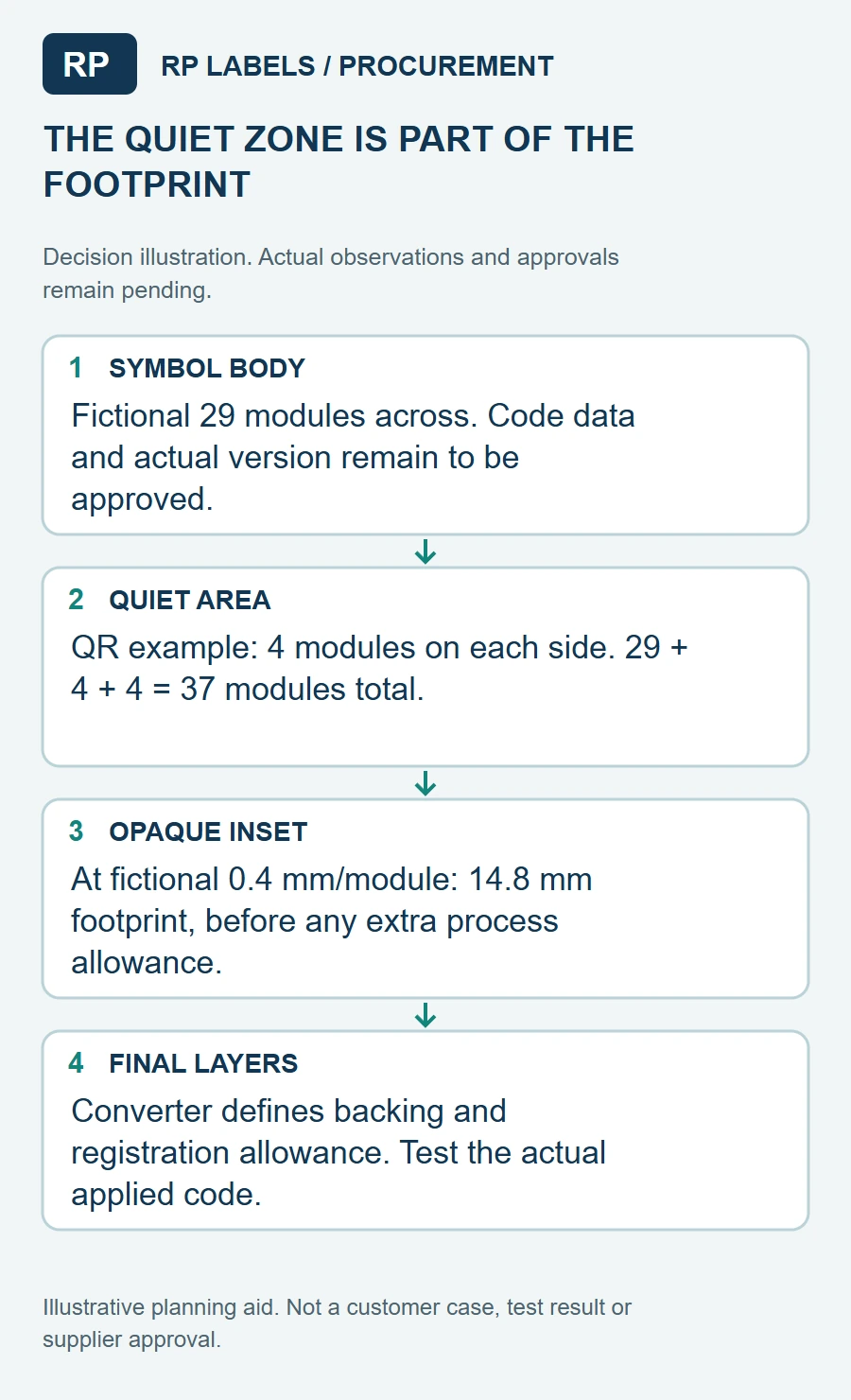
If I were approving the order, I would start with the smallest finished label size and the least favorable package color, not the large screen mockup. Draw the holographic design, then reserve an opaque nonreflective inset for the actual code. Include its quiet zone as part of the inset, not as a margin that can later be filled with foil texture, decorative lines or a logo.
Separate the optical jobs
Holographic effects rely on changing reflected light. A QR symbol relies on a reader distinguishing dark and light modules. The GS1 2D Barcode Colour and Quality Guide warns against printing 2D codes directly on shiny or reflective material for POS scanning and recommends strong contrast and a clear quiet zone. This guide is a useful design baseline even when your use case is a phone verification scan; the final reader and lighting still need their own test.
Keep the opaque inset large enough for the encoded content and its quiet zone. The GS1 retail 2D guideline explains that QR Code quiet zones use four module widths on each side and that graphics entering this area can harm decoding. Do not treat that as a universal finished-label dimension: the module size, print process, code density and scan distance determine the actual space. If the design is too crowded, shorten the destination data or enlarge the label instead of shaving off the margin.
Know what the code actually does
One identical QR printed on every sticker can open a website; it does not by itself prove that each product is unique or authentic. If the buyer needs unit-level verification, decide who creates individual identifiers, what page answers the scan, how the records are reconciled and what happens when a code is copied. Our link-ownership guide covers the destination decision. Keep the security claim no broader than the system that has actually been built and tested.
Ask the converter to show whether the opaque area is an ink layer, a separate patch or another construction. Verify how it behaves when the hologram is die-cut and dispensed. A beautiful white square that shifts toward an edge can consume the quiet zone. If the label is applied over a carton corner, seam or highly curved bottle, scan it there too; flat-sheet success is only one part of the job.
Test with the real artwork and pack
Print a small physical sample at finished size with the intended foil, ink and code data. Apply it to the actual package. Scan from the expected consumer distance using more than one ordinary phone, in bright and low indoor light, and at several tilt angles that expose the hologram's glare. Check the code both before and after routine handling. If a retail POS scanner matters, use that scanner or a proper verifier; a phone camera is not a substitute for barcode quality verification.
Record failures by cause: glare over modules, white inset too small, a foil edge intruding into the quiet zone, low contrast, damaged print or a destination error. Fix the cause rather than declaring the entire holographic concept impossible. The right solution may be a larger opaque panel, a different finish, a second label, or a separate code on the carton. These are concrete purchasing tradeoffs, not cosmetic preferences.
Send a scan-ready quote brief
Provide the container or carton, exact label size, intended scanning device, encoded URL format, static-versus-unique data decision, expected lighting, target placement and the responsible owner of the destination page. Request a foil sample with the opaque inset and actual encoded data. Approve the holographic effect and code performance separately. A quote for "custom QR hologram stickers" without those details leaves too much to interpretation.
Sources and scope
Reviewed October 7, 2026. The primary references linked below support the identified technical points. Buying scenarios and inspection checklists are editorial guidance, not RP production records, certification, legal approval or universal acceptance standards.
A longer payload can change the inset decision
The exact encoded content belongs in the layout review before the white inset is approved. DENSO WAVE’s version guide explains that data amount, character type and error-correction level affect symbol capacity and module count. If the generator needs a larger grid while the designer keeps the same physical square, each module becomes smaller.
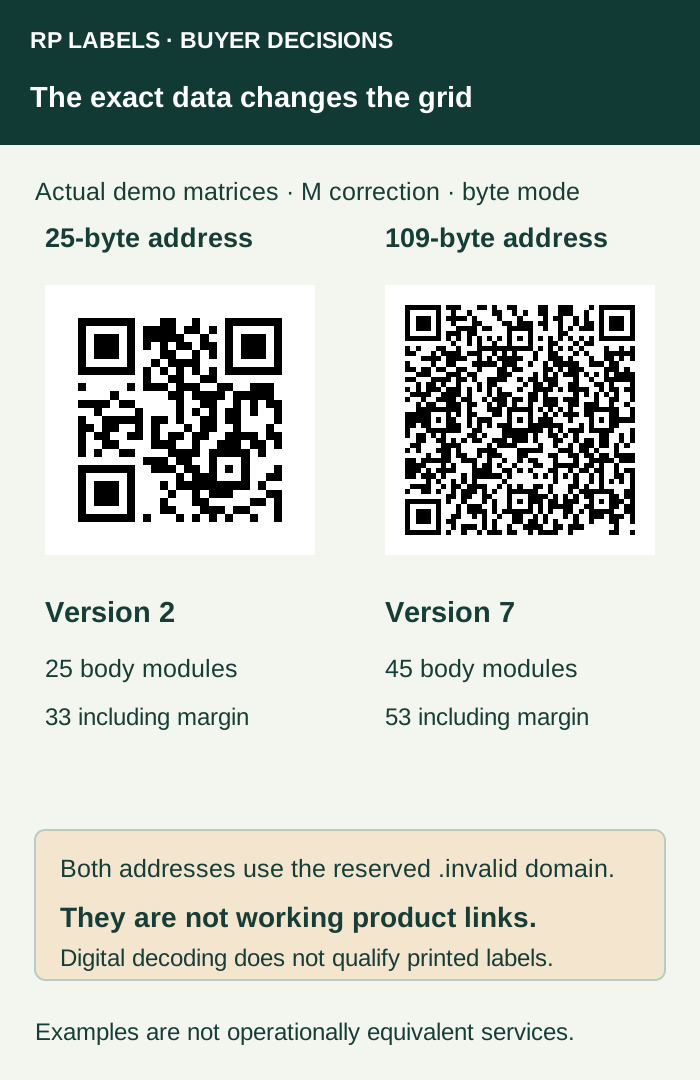
The first matrix encodes https://example.invalid/a, a 25-byte ASCII string. The second encodes a 109-byte demonstration address with a longer path and query fields. With the stated generator settings they require Version 2 and Version 7 respectively: 25 and 45 modules in the symbol body, or 33 and 53 across when the four-module margin is included on both sides. These results describe these exact demonstration inputs; character count alone cannot predict every QR configuration.
Retain the generator settings and the approved raw payload with the artwork. The addresses are not two operationally equivalent services: shortening a value requires the application owner to preserve the intended data and destination behavior. Use the link-ownership guide before adopting a controlled short address.
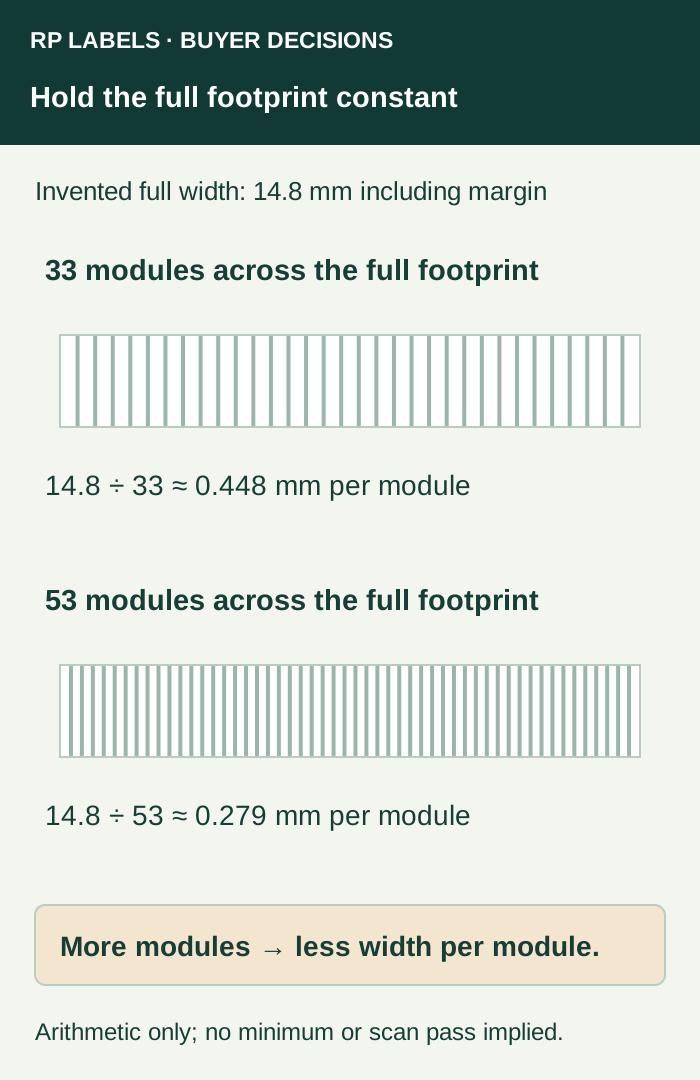
This is why reserving a square using an early short sample can be misleading. At the same invented full width, the longer example leaves less physical width for each module. DENSO WAVE’s code-area guidance connects symbol version, module size and the required margin. The chosen printer, material, finish, curvature and reading conditions still need their applicable review.
Ask the data owner for the longest permitted production payload or a representative maximum under a defined rule. Have the converter review the actual resulting symbol and full footprint at final size. Then choose a larger inset, a larger label, a different placement or an approved data change if needed. Do not remove required business data or quiet area merely to make the artwork fit.
The demonstration matrices were generated from the recorded strings and independently decoded as digital fixtures. That checks the supplied examples, not an applied hologram. Keep the final production sample’s actual decoding, authorized-data comparison and print-quality evidence separate.